
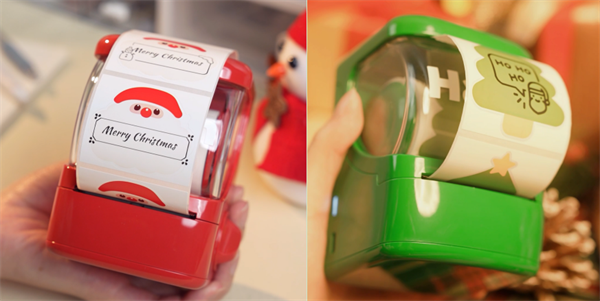
Christmas gift tags add a personal touch to holiday presents, but handwriting labels for multiple gifts can be time-consuming. A Bluetooth label maker offers a convenient alternative, letting you create personalized Christmas gift labels at home with your phone.
Here's when printed labels make sense, what types of Christmas gift labels you can create, and how the Hanin New 1 portable label maker can bring your holiday gift-wrapping ideas to life.
When Should You Print Christmas Gift Labels Instead of Writing Them by Hand?
Handwritten Christmas gift labels feel personal and handmade. But when you have several presents to wrap, writing every name and greeting by hand can be time-consuming, and keeping each label neat and consistent isn't always easy.
A Bluetooth thermal label maker like Hanin New 1 offers a practical alternative. You can customize designs on your phone and print them on compatible self-adhesive labels.
✔️ Keep a consistent look: Use matching fonts and layouts to create coordinated holiday and Christmas gift labels.
✔️ Save time: Reuse a design or customize the text for multiple gifts without writing each label from scratch.
✔️ Personalize every gift: Customize names, holiday greetings, and simple designs on your phone, then print them on compatible self-adhesive labels.
✔️ Inkless printing: Thermal printing eliminates the need for ink cartridges or toner, helping reduce ongoing printing costs.
Whether you're preparing gifts for family, friends, or coworkers, a portable label maker lets you make holiday gift tags quickly, neatly, and festively.
What Christmas Gift Labels Can You Create with a Bluetooth Label Maker?
From simple name stickers to coordinated holiday labels, a portable label maker gives you several ways to personalize gift packaging.
Paired with Hanin New 1, the HerePrint app offers a wide selection of label templates, fonts, vector icons, and stickers, making it easy to design DIY Christmas gift tags in styles that suit your taste.
Here are a few ideas to get you started.
• Personalized Name Labels
Sometimes, a name is all you need. Create labels such as "For Emma," "To Dad," or "Made Just for You" to identify each present and give the packaging a personal touch.
These personalized Christmas gift labels are especially useful when several gifts are placed together under the tree. A consistent layout can make the whole collection look more organized.
• Festive Message Labels
Short holiday greetings can make a simple package feel more thoughtful. Try messages such as:
✔️ Merry Christmas
✔️ Happy Holidays
✔️ With Love
✔️ A Little Something for You
✔️ Open with a Smile
Keep the wording short enough to remain readable on a small label. Depending on your compatible label stock and available templates, you can also incorporate simple seasonal graphics or decorative elements.
• Matching Labels for Gift Boxes and Bags
Want your gifts to look like they belong together? Create a matching set of Christmas gift labels using a consistent design.
You might use one style for family gifts, another for friends, or the same layout across several gift boxes and bags. Matching labels can also work well with homemade treats, small presents, and other holiday packages.
How to Make and Print Christmas Gift Labels with Hanin New 1
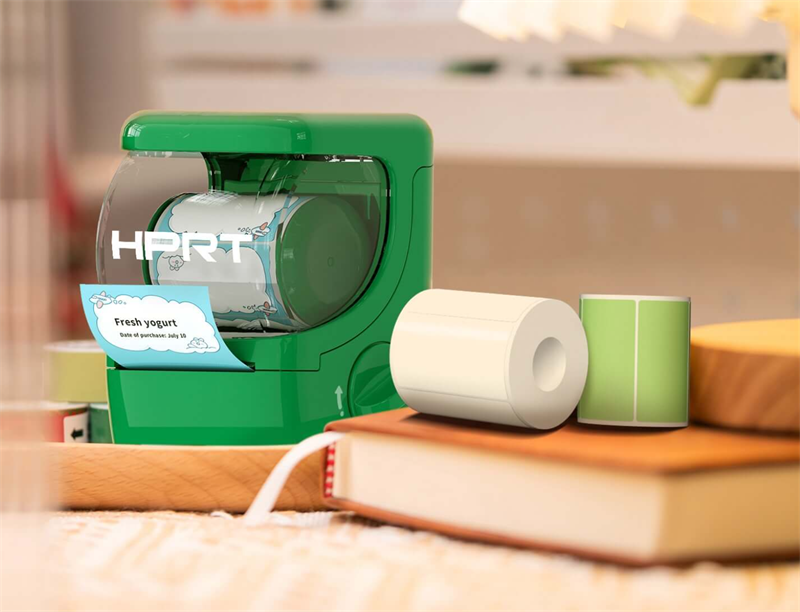
Hanin New 1 brings creativity and convenience to everyday labeling. This compact, portable 2-inch inkless label maker lets you turn ideas into personalized labels right from your phone, whether you're organizing your home, sorting storage boxes, or adding a creative touch to DIY crafts and gifts.
Here's a simple way to use it for your Christmas gift-wrapping projects.
1. Load the Label Roll and Power On
Featuring a playful twist-to-open design, Hanin New 1 makes loading labels simple. Turn the knob clockwise to open the cover, insert the label roll, ensure it feeds correctly, then close the cover and power on the printer.
Tip: Choose genuine Hanin label rolls to suit your gift packaging. Narrower labels work well for small gift bags, while wider labels offer more room for names and greetings.
2. Connect to Your Phone
Download the HerePrint app from Hanin's official website, open it, and connect your label maker via Bluetooth.
3. Choose a Template or Customize Your Design
Explore HerePrint's wide selection of holiday and gift templates, fun icons, and stickers, or create your own design with personalized names and festive messages.
4. Preview and Print
Check your design, select the number of copies, and tap Print. Once printed, apply your labels to gift boxes, bags, or other suitable packaging surfaces.
Watch the video below to see how to load labels and connect the NEW 1 printer.
Add a Personal Touch to Your Christmas Gifts with Hanin New 1
From personalized name stickers to matching holiday labels, small details can make your Christmas gifts feel more special. With Hanin New 1, you can create custom designs in the HerePrint app and print them on demand—without ink or toner.
Ready to get creative? Explore the Hanin portable label maker and discover more ways to personalize your gifts and everyday labels.